
Skip to content
Cisco Website Hero Badge

The #1 Interop Solution for Cisco Video Devices

Synergy SKY CONNECT extends Cisco video devices with secure cloud-to-cloud interoperability for Microsoft Teams, Zoom, Google Meet and FaceTime. No plug-ins for users. No self-hosted servers required for the pure cloud deployment. Just the green button people already know.
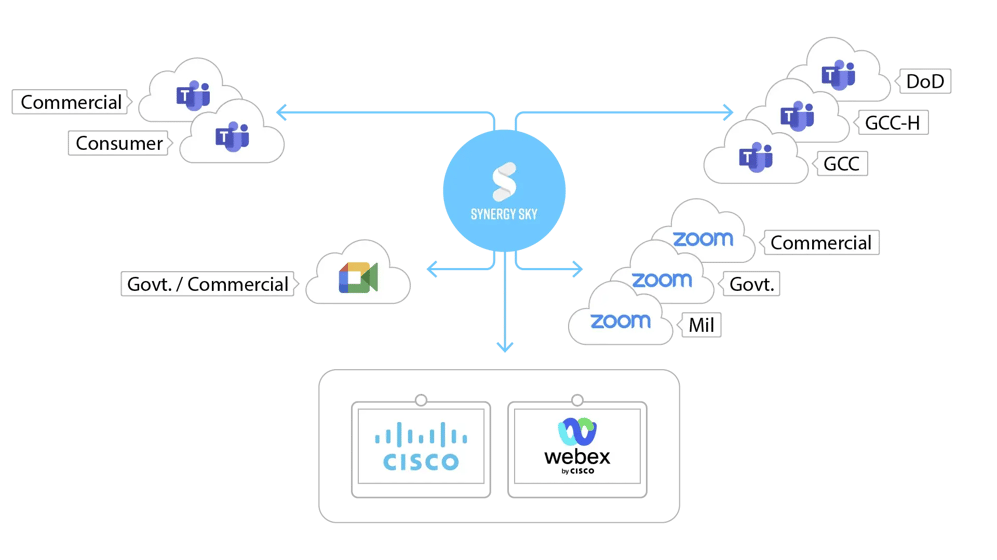

Modern meetings are not just multi-platform.
They are multi-cloud.

Cisco Webpage Diagram 7

Customers, partners, regulators and suppliers bring their own meeting environments. Even inside Zoom and Microsoft Teams, meetings can live in Commercial, GCC, GCC High, DoD or other cloud instances. Cisco rooms need to join the meeting behind the link, not just a single platform label.

  • One access model for many clouds
    Give users a consistent Cisco room experience across different tenants, regions and meeting platforms.

  • Built for external collaboration
    Support the reality that many important meetings are hosted outside your organization.

  • Ready for what comes next
    Web-based meeting services evolve continuously. CONNECT is designed around the meeting link, not a fixed single-platform assumption.

Optimize Cisco devices on all networks

icon building 2

On-premises / Self hosted

icon government 2

Public Cloud

icon webex cloud 3

Webex Cloud

CONNECT is built to fit your environment, not force you to change it. No matter deployent it gives you full flexibility to meet compliance and performance requirements while integrating seamlessly with existing infrastructure.

As your organization evolves, CONNECT evolves with you, eliminating the need to replatform and reducing long-term risk while ensuring a consistent, reliable meeting experience across all environments.

Cisco gets more with CONNECT

Cisco Webpage TrueView graphic medium 8


icon transition

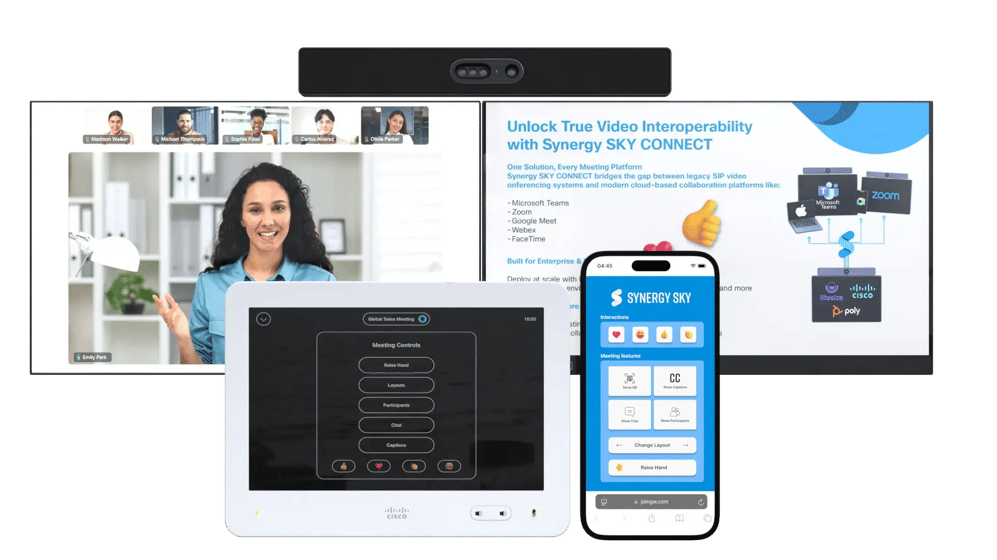
Enable content sharing across platforms, including PowerPoint Live and whiteboarding features. Cable or wireless.

icon replace

Dual screen in all meetings.

icon app

TrueView Engage: Access native modern meeting controls from touch and mobile.

icon calendar

Book a Teams,Google or Zoom meeting from the preferred calendar

  • Google Calendar, Microsoft Exchange, O365, GCC, GCC High, or GCC DoD are supported
  • Deploy Synergy SKY CONNECT alongside your existing infrastructure
  • Push the green button on a Cisco device to connect, OBTP
icon join 2

Start all meetings your way

  • Click to JOIN: Start the meeting by pressing the green button on the Cisco touch panel
  • Scan to JOIN: Scan the QR code on the screen and select which meeting to join from your cellular phone
  • JOIN by ID: Enter the meeting ID and join the meeting without booking the room
icon scheduling

Join Teams, Zoom or Google meetings from externally received invitations

  • Connect to meetings hosted by external organizations
  • Forward meeting invitations to your Cisco device address
  • Join with One Button to Push from the Cisco / Webex interface
Cisco Webpage Diagram

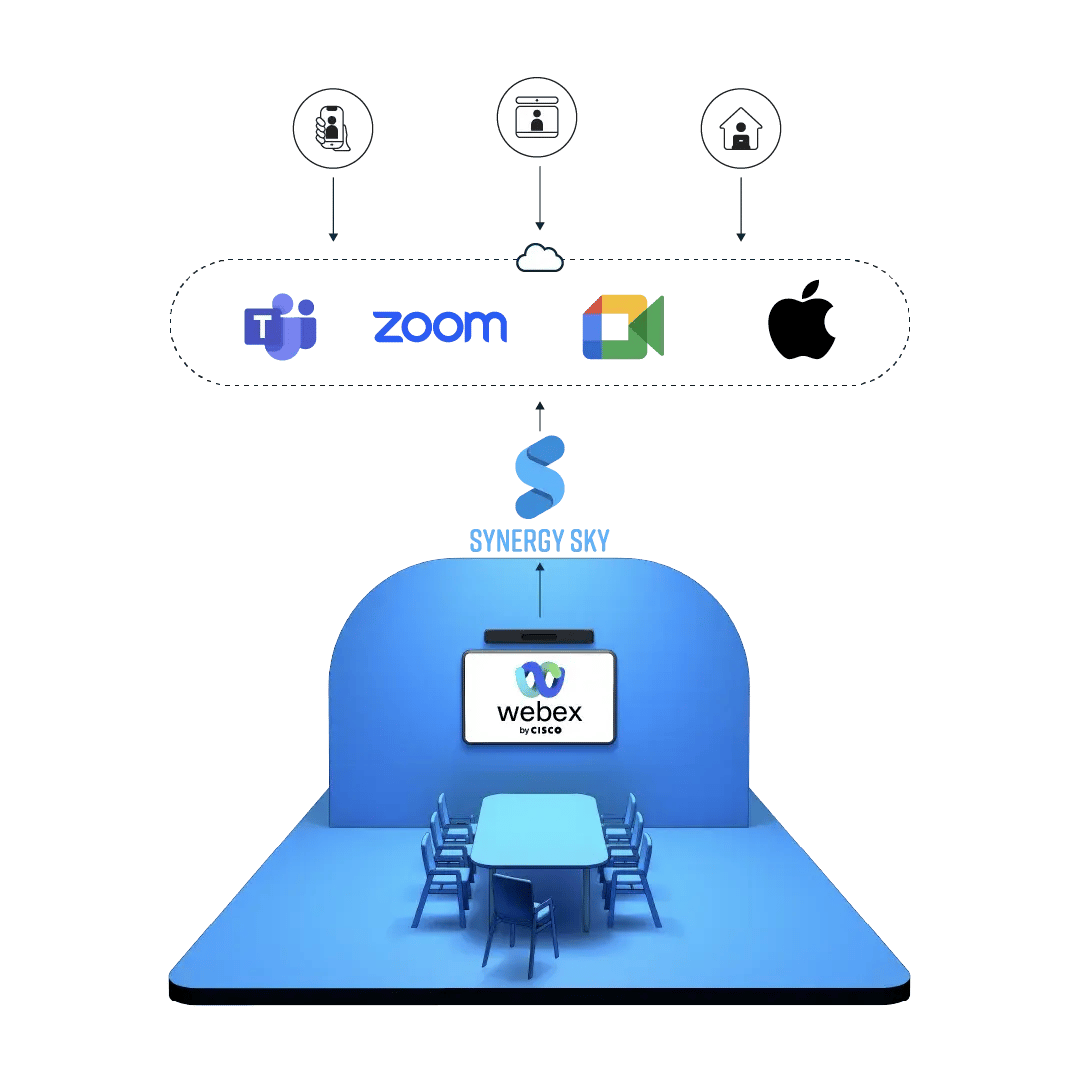
Connect Cisco to all meetings

  • Extend your Cisco video conferencing systems with standards-based interoperability.

  • The only service your Cisco device needs.
icon transition

Standards-based integration for Cisco video endpoints

Synergy SKY CONNECT uses a patented protocol translation layer to enable Cisco video conferencing systems to communicate across different meeting platforms. This standards-based approach maintains security compliance while extending the functional capabilities of your existing hardware investment, regardless of device age or model.

icon replace

Works with any model and generation

Synergy SKY CONNECT brings extended functionality to any SIP-based Cisco video conference device through protocol-level integration, enabling One Button to Push (OBTP) and cross-platform meeting connectivity.

nissan

Cisco + Synergy SKY

Nissan Levels Up Meetings, Joins Teams & Zoom Seamlessly

Read more

FAQs about Cisco Video Conferencing Connectivity

How does Synergy SKY CONNECT integrate with Cisco video conferencing systems?

Synergy SKY CONNECT functions as a standards-based gateway between your Cisco video endpoints and web meeting platforms like Microsoft Teams and Zoom. The integration works at the network protocol level, connecting different systems without requiring hardware modifications or replacements. For IT departments, this means maintaining your Cisco investment while adding cross-platform compatibility. The solution integrates with your calendar system, allowing meeting details to flow automatically to your Cisco devices for one-button joining.

Does Synergy SKY require replacing existing Cisco hardware?

No.
Synergy SKY CONNECT is designed specifically to extend the functionality of your existing Cisco video conferencing equipment without replacement. Our patented CONNECT technology works with both current and legacy Cisco endpoints, including devices that predate platforms like Microsoft Teams and Zoom. This approach maximizes your return on investment while enabling your Cisco systems to connect to modern meeting platforms through standardized protocols.

Which meeting platforms can Cisco devices connect to with Synergy SKY?

Synergy SKY CONNECT enables Cisco video conferencing systems to join Microsoft Teams, Zoom, Google Meet, Webex, and Apple FaceTime meetings. Our standards-based gateway allows seamless connectivity across platforms. This means a single Cisco video room can connect to any meeting regardless of the platform being used, with consistent functionality for content sharing and meeting controls.

How does content sharing work between Cisco endpoints and other platforms?

Synergy SKY CONNECT enables bidirectional content sharing through protocol translation. When someone shares content from a Cisco device, our gateway converts the signal to be compatible with the target platform. Similarly, when content is shared in Microsoft Teams (including PowerPoint Live and whiteboarding), CONNECT makes this visible on the Cisco endpoint. This technical integration happens at the network level, without requiring additional software on the Cisco device.